Showing posts with label patient flow. Show all posts

Monday, June 30, 2008

“Please Arrive 15 minutes Prior to Your Appointment”

Mark just arrived to his appointment 5minutes late for a 5minute appointment. Normally I’d rush in to see him before my next appointment which is ½ hour but he walked by my window opening the lid on a cup of coffee (that he must have obviously just bought) so he can wait. When should he have arrived?

The goal of our clinic is to match my time with the patients’. The more space in the day, the greater the wait time to get an appointment. The tighter the schedule, the greater the risk of a long in-office wait.

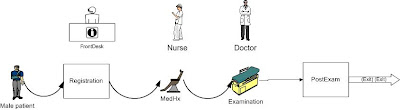
Having people arrive prior to the scheduled appointment with the doctor has two purposes. One is to allow them to perform the necessary pre-appointment steps (what lean specialists would call value-added steps) such as registration and review of the medical history. It also allows the doctor to pack the schedule by creating a buffer of time. Office wait times (not associated with necessary steps) are non-value added for the patient and should be minimized.

Since neither the patients nor the doctors timing is perfect some wait is inevitable. Below is a graph of patient arrival time vs scheduled time. If negative, they arrived after the appointment time. If positive, they arrived prior to it. All are asked to arrive 15minutes prior to the appointment.
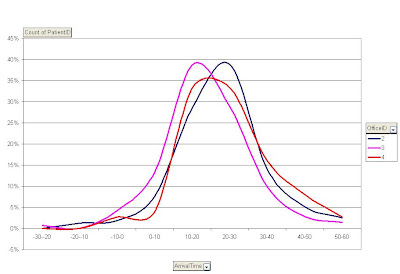
I’ve shown before that in our office registration and review of the medical history takes 14 +/- 7 minutes. Based on a normal distribution, roughly 66% of people will require 21minutes or less for the pre-doctor time. The reason patients are not asked to arrive 21 minutes prior to the appointment, is that there is variation in the arrival time which favours the office. Patients tend to exceed our expectations.


Since the average patient arrives 22 +/- 12 minutes before the appointment the 15 minutes is appropriate but the math is not simple. If the patient pool had a more complicated medical history or the administrative staff was unable to manage the crush of patients every 15 minutes then the window would have to be expanded and with it the non-value added time. For other offices, adding the normal arrival variation to the value-added pre-appointment steps will allow you to calculate when to have patients arrive.

Friday, June 13, 2008

How long should you have to wait in the doctors’ office?

After a week of Risotto and mountain biking I'm back to statistics. But before you do jump over the Rheumanation to read a list of top ten signs you have a wait time problem (it's funny and links back here). People often land at this site searching for a standard amount of time of time to wait in the doctors’ office. Providers often come here looking for some type of guidance about how long is reasonable in-office wait times.

Here is one answer. Assume that you’re family doctor with 15 minute appointments. In a 4 hour chunk of time you have 16 people booked. Everyone arrives early enough for your administrative staff to register them (2.5min), the nurse to update their medical history (3min), you spend exactly 15minutes with them and the front desk checks them out and arranges the next appointment (5min). Life is perfect and no one waits in the office.

Variation

The reality, as any health care provider realizes, is that nothing goes so smoothly. Variation in the number of people seen, the time people arrive at and the time it takes in each step causes the process to go faster or slower. The good news is that EMR and process simulators allow us to measure, analyze and replicate a standard day and look for improvements.

To decrease the total time a process requires the average time and the amount of variation must be contorl. The effect is about 75%:25% on the total time. The notation I’ll use is mean time (or patients) +/- standard deviation assuming that the number of people arriving and the variation in the time of each step is a normal distribution.

More Realistic Numbers

Let’s look at the scenario again.
Number of Patients 16 +/- 3
Arrival Time 15min +/- 5
Registration 2.5min +/- 1.5
Update Medical History 3min +/- 2
Examination 15min +/- 7.5
Administration after Exam 5.6min +/- 2.4
With 1 minute to move between each step


The Answer

I then run this scenario for a 4-hour block and replicate it 20 times to calculate an average:
The team will run over by 20 minutes on average (4.3 hours)
The average time in the office for the patient is 44 minutes
Time average time spent doing nothing (waiting) is 14 minutes. In this case the doctor had high variation (50%) so most waiting was done waiting for the doctor.

Discussion

I’d previously said that our office strives to get people in and out within 50minutes (and the typical consult is 15minutes) so this seems intuitively correct. If the numbers are increased to one patient every 30 minutes (8 +/- 2 patients in 4 hours) and the variation remains the same the average time in the office is 49 minutes. The longer the appointment the less significant the natural variation is and the more predictable the time should be. The simulations can be run for any type of scenario and are useful for bench marking performance and finding problem spots. There is no single answer to how long one should wait in the doctor’s office. It depends on the emergency volume, after length of the appointment and how much slack is in the system.

Where to Start

If you're a doctor with a problem start by measuring how long people spend in your office for a standard length of appointment. If people spend and average of 45 minutes there for a 15 minute appointment it's within reason. If it's an hour and 45 minutes you have a problem.

Friday, May 9, 2008

Leveling a Process – Eat My Words

It’s time to eat my words. I finally got my hands on a process simulator to test out a hypothesis that decreasing the variation in a process has a more profound effect than decrease the average length a process takes to decrease office wait times

I used the data that I’d previous posted on how to create a process map and pumped in the numbers about waiting in the doctors office. The mean time of a process is the average of how long it took to complete a single task (e.g. the average exam was 12 minutes) and the standard deviation was the amount of variation in the time (for the math majors out there it’s a normal distribution). So the average exam by a doctor took 12 +/- 6 minutes. I then plugged the following numbers into the simulator:

Registration 3 +/- 2 minutes
Medical History Review with Nurse 11 +/- 5 minutes
Consultation with Doctor 12 +/- 6 minutes
Check Out (book next appt) 7 +/- 3 minutes

The front desk completed the first and last tasks and the bottle neck is the doctor.

The results showed that the doctor was utilized 100% of the time with the front desk and nurse being idle about 50% of the time and 30 patients could be seen in two 3.5 hour sessions (7 hour day).

If the average time each task took was decreased by 20% then you could see 13% more patients
If the average variation (standard deviation) was decreased by 20% then you could see 7% more patients.
If you decreased both average and standard deviation then you could see 20% more patients.

The variation only accounts for 1/3rd of the ability to see more patients and the average time is closer to 2/3rds. The end result is I have to eat my words that variation is more important than mean when calculating office wait times. But if you’re looking to improve a process it goes to show that decreasing the variation in the time a process takes is [almost] as important as decrease the average time it takes.

Wednesday, April 2, 2008

High Stakes Email

High stakes emails (patient communication, reports, test results, prescriptions) need to be managed differently. Technology advancements in electronic communication can improve patient flow and health care wait times but it comes at a cost both in money and complexity. Our office has been communicating with referring offices, staff and patients for about 5 years now. Since my blog is about how clinics can manage efficiency I wanted to share our experience with email.

First, there is a big difference between the jokes I send my friends and communications about patients. I call the latter high-stakes email. High-stakes email includes receiving and sending referral letters, x-rays, communication to referring practitioners and patients, test results and e-Prescriptions. The technology involved can either hurt or help practice management so it needs to be well thought out. Here’s our experience.

Plan on errors: There is a big difference between being a single practitioner on a scooter with an i-phone, no staff and 500 patients and a larger clinic. The more patients you’re dealing with and the more people (staff and doctors) that are handling the emails the greater the chance of error. In short, if there is a way to mess it up it’ll happen. I have seen emails sent to every imaginable misspelled address, drag & dropped emails into never-never land, accidental deletions and much much more. The system needs to be designed to prevent errors.

Size matters: Not only will you have a greater number and variety of errors but you’ll be the target of attack. Size breads complexity so as you’re clinic grows the way you manage emails will need to change. Public accounts (gmail, yahoo, hotmail, etc…) cannot be used due to privacy and the chance of error. Spammers will also flood you're system so be prepared.

The effect of SPAM: Any network will be the target of attack. SPAM now makes up 80% of the worlds email (see Symantec reports). You’re system needs to be able to reliably sort the incoming email from the SPAM. Our office first scans for viruses then as SPAM. If a file has a possible virus it is automatically put into the SPAM folder. This double layered approach can create problems, because if a file is sent with an attachment that triggers either the virus or spam filters it will be quarantined. The staff dealing with communication needs access to the quarantined folders to find wrongly filtered emails.

Automate: Whenever possible we’ve automated drag/drops, moving of files and responses because on a large scale errors happen. For instance, when a patient is referred to the practice it is automatically imported into the referring managing software with attachments. When the new referral is checked by a staff member and data entered into the proper fields (name, phone number, etc…) an email is sent back to the source with the details of when and who processed the referral. As I’ve said in previous posts, the greater the number of steps the greater the chance of error. With automation, the chance of error is greatly decreased. Part of that automation is to add an automatic privacy statement to the bottom of each email.

Maintain Control: Whether you choose to have servers on or off-site maintain control. The real benefit of using e-communication is the integration it has with other programs. If you’re using a third party system, it’s more difficult to have automated actions (such as importing files directly) which decrease the error rates. Also, for control of spam and viruses you’ll need access to the quarantine areas of the system.

Request Read Responses: For medico-legal reasons you need to know if and when emails are read. Request the read response and have a system to track who hasn’t responded.

Tightly Control Email Addresses: Misspelled addresses are the norm. Create as many misspellings as you can and point the misspelled addresses to the proper addresses.

Get Help: Between misspelled addresses, 80% spam, viruses, dropped/lost/forgotten files, the desire to automate and everything else that happens with a small email network you’re going to need help. Find someone that has a broad knowledge base in database management, network and email management and pay them well. I found it cost more when we were cheap with out IT consultant.

Those are the major pitfalls that have befallen us over the last five years. We try to keep our error rate to 3.4 per million (6 sigma) but it’s a never ending battle. I hope sharing our missteps will help someone else that’s starting to use email.

Monday, March 31, 2008

The Effect of Nurses on Patient Flow

When it comes to health care wait times and ER wait times nurses play a major role. Our office conducted a survey several years ago and asked all staff, including doctors, to list their role in patient care. Surprisingly, every group listed patient flow near or at the top of the list. We wanted to know what effect each group really had on patient flow so we data mined 596 patient records and examined their wait times once in the office. Specifically, this was for consultation regarding a general anaesthetic for a minor procedure in the office. When the patient has their medical history completed (on an Electronic Medical Record) the nurse that records it is stamped with the date & time. This particular part of the study examined the effect nurses had on patient flow. The nurses, in our office, play a wide variety of roles. Once the patient is registered they walk them to the consultation area, take x-rays if needed, complete a medical history (and hunt down any medications from families and pharmacies) and frequently bring the patient to the front again for treatment planning.

Based on this patient pool, the nursing role used approximately 42% of the time and caused 42% of the variation in the patients’ appointment. This figure, however, will be highly dependant on the procedure being completed and adds little to our understanding of what causes wait. The more telling number is the effect of nursing seniority. There is a relationship between less experience and more waiting. In the graph below the most senior nurse is ranked as #1 (roughly 15 years experience in the office) and the least senior is ranked #11 (roughly 1 year). As the seniority increases the office wait time goes down (it is approximately flat after 3 years of experience). The R2 value roughly translates to the amount of variation that can be explained by the factor being examined. In this case, roughly 26% of the variation that is seen in then nursing wait times can be explained by the seniority of the nurse. Remember that the nurse accounts for 43% of the total time with the patient so seniority accounts for approximately12% of the variation in wait time.

In our case it is the nurse that assumes the major role in the office with patient interaction. Since experience plays such a major role, there should be a mandate in each office to train the person that fills similar roles well. Does your office train the person by osmosis or is there a thoughtful training program? I’d recommend the following strategy:

Decide which tasks make up the majority of the work for the nursing role
-Which computer skills will be needed?
-If procedures are involved (surgical/interventional) provide some training so the person has context
-Create a learning program that educates at a reasonable pace
-Provide and maintain reference materials for study
-Especially drug references and procedures
-Create training that comes in a variety of formats
-Create goals within a timeframe so that people have something to work towards

As an example our office:
-There are 2 week, 3 month and 1 year objectives
-Nurses learn the procedures during the same time that they start doing the consultations for the patients. This way they learn the “important” questions to ask
-Drugs frequently used during the procedures are specifically listed and they are asked to learn more about their pharmacology
-Drugs that can cause surgical problems (anti-coagulants, bisphosphonates, cardiac, etc…) are specifically listed as well
-There is a learning program from basic to more complex objectives

It’s beyond the scope of this particular blog to list all the objectives but health care wait times have a real and linear relationship to nursing skill and experience. Being aware of how important the nursing role is, and providing sufficient training is important. It is even more important if you’re clinic or hospital suffers from high turnover (>20%) as this means few of your nurses are likely to be highly proficient. Value their experience, assist them in learning and do not underestimate the impact of high turnover.

Tuesday, March 18, 2008

5S - The Foundation of Improving Process

5S (Sort, Simplify, Sweep, Standardize, Sustain) is the philosophical basis for improvement of health care wait times. There are only so many scheduling “tricks” and reallocation of resources that can improve patient flow then process must be advanced. 5S is a reference to a list of five Japanese words that start with the letter S. In Japan, businesses and people adopted it as a way of life. In North America and the UK we view it as a means to improve process.

The two key targets are to improve morale (with a clean work environment and ownership) and improve efficiency (by decreasing clutter and adding visual cues). Think of a surgical tray. For a practiced surgeon or scrub nurse/assistant; if even a single instrument is out of position it’s noticed. There are visual cues on the tray for procedures such as notes to give antibiotics in the prep tray, or a note to “time out” (check the procedure) with the marking pen. Another example is the resuscitation room where passionate arguments can flare about the best location for the defibrillator. Both are examples of 5S.

The benefits come from the employee deciding what should be kept, where it should be kept and how it should be stored. The process transfers ownership of the process to the employee and builds a clear understanding of work flow. It can be as simple as re-organizing the desk of an administrator (see this story for an extreme example of a disorganized desk leading to disaster) or as complex as cleaning and reorganizing an ER to optimize patient flow.

The 5S’s are:
Seiri (整理): Sorting. The practice of storing or discarding all but the essential tools/materials for a process to decrease hazards and clutter.
Seiton (整頓): Simplifying. Creating an orderly workspace that puts tools and materials in a place to minimize extra movement and improve workflow.
Seisō (清掃): Sweeping, Systematic Cleaning, or Shining. Making cleaning an area part of a daily routine and build it into the routine of workflow (usually at the end of shift) rather than a sporadic action.
Seiketsu (清潔): Standardizing. Whereas systematic cleaning is making an area clean, Seiketsu means standardizing the workflow so any repetitive work is conducted in the same manner.
Shitsuke (躾): Sustaining. Regularly reviewing and improving the 4S’s above.

The 5S’s are well proven in real world applications to improve productivity and morale (Toyota, Hewlett-Packard, Boeing to name a few). By improving patient flow by 10% in the OR there could be a corresponding drop in surgical wait times by 10%. For the GP’s out there, how many times in a day do you have to go “hunting” for materials for a routine patient (swabs, requisitions, etc…)? Hunting for pens & stethoscopes in hospitals is a running joke. It is not enough for the practice manager, administrator or provider to be the only believer in the system. 5S is a concept about global changes and ownership of process by the people that provide it. Adopt 5S, and then apply it to processes in a practice both big and small.

Monday, March 17, 2008

Five Ideas: The Doctors to Get Patients an Appointment Faster

Here are five ideas for the doctors/providers to decrease how long people wait to get an appointment. I’ll be doing a series of entries in the coming weeks with ideas directed to doctors/providers, front desk (administrative staff) and clinic staff. Each entry will either help get appointments sooner, keep people waiting in the office less or improve efficiencies. The first entry is for doctors/providers to get appointments faster.

Here are the ideas:
1. Work: A major determinant of patient wait is doctor availability. Try matching days worked to seasonal variation in wait. In our practice the end of August is busy so we put a “moratorium” among the doctors on vacations. We also monitor wait by yearly quarters and try to match days between our offices. “Doctor Days” is the easiest measure but it can be hours, weeks or some other time frame. All wait times and other measures of efficiency are taken in the context of days worked. For instance our wait time went up 10% but our doctor days went down 15%. There is a net improvement in efficiency of 5%. I have also seen doctor days go up 20%, wait times remain unchanged and efficiency drop 20% meaning the extra days where literally useless (this can happen when the clinic is still underutilized). Days worked must be monitored to make any sense of efficiency and wait times. Have someone start recording doctor days on a monthly basis.

2. Set acceptable wait times and monitor: In my entry on block booking I described setting goals for different patient types. The provider and staff have to decide what an acceptable wait is. In a busy clinic it is important not to see clients too soon. It sounds counter intuitive but time saved with one patient can be spent with another so if you delay seeing one patient for a reasonable amount of time you can get another one an appointment in an acceptable amount of time. For instance an asthma exacerbation and sore knee. Neither wants to wait but from a clinical perspective if you let the knee wait a bit longer you can get the asthma patient in sooner. Take two actions: a) start monitoring wait times b) set ideal waits for major patient groups.

3. Don’t see more consults than you can do procedures: The concept that time saved with one patient can be spent with another applies to this suggestion. I sometimes meet clinicians that are procedure oriented who have no balance between the number of consultations they do and procedures they complete. If for instance, you can only do 5 procedures per day and you have 80% follow-through from consultation to procedure, you should see an average of 5 divided by .80 = 6.25 consults per day (6 for 3 days and 7 the 4th day). Seeing more than that does not help the patient get the procedure and fills time that could be spent elsewhere. Count the number of procedures & consultations in a week and see if they match.

4. Single day consult/surgery: I’ve done an entire entry on this under phone screening. If the clinic is geared towards completing a procedure on the same day it can save time for the clinic and improve patient satisfaction by completing it the same day. Look through minor procedures that are done in the clinic and determine if any can be condensed into a single day appointment with either better phone screen or improved organization.

5. Whole Day Blocks: Some times you simply can’t catch up. This is common with seasonal work loads or in group practices when one/many providers take vacation. If you are monitoring wait times by different patient groups and an isolated block of patients are waiting much too long dedicate an afternoon/day to just that patient group. It goes against the one-piece work flow idea but sometimes resources need to be temporarily reassigned. This is where practicality sometimes runs into a wall with Lean advocates. The argument is that reassigning resources in this manner disrupts work flow; increases variation and decreases efficiency which ultimately increases wait times. My argument is that if the reallocation is measured, proportionate and limited it quickly corrects and in-efficiency. It will not work unless you are using block booking (if you are not using block booking all patient wait longer not just the one group). Look for one patient group at one time of year and plan an entire day to deal with the work.

Saturday, March 15, 2008

Stacking Rooms

I keep trying to tell my friends not to stack patients in rooms. There are two arguments to be made. My friends tell me to "have everyone arrive at once". The [midguided] logic is that they'll all get registered, put in a room and the provider can work at warp speed to get through them. This will supposedly provide the most efficient clinic.

The reality, and evidence, is that good work flow will make it faster for everyone. Having really well timed appointments so that there is a minimal of waiting both for the patients and doctors. Don't believe me?

Ron Pereira made a video of stuffing envelopes. It sounds unrelated but hear me out. There are two methodolgies. Stacked queue vs one-piece flow. The stacked queue is having everyone arrive at once and the one-piece flow is having well timed sequential appointments.


Check out the video here . Ron is definately not a video editor he taped the entire stuffing process so find you're fast foward button.


Spoiler alert!!!!


The one-piece flow wins by over 30%. By having well timed sequential appointments not only will you have better client satisfaction but you're office will run 30% faster.

Friday, March 14, 2008

Bottle Necks

You can look for bottle necks in entire processes (e.g. from 1st referral to a procedure) or drill-down to in-office detail (why someone will wait an hour for a quick look at their throat). But the first step to managing waits is to look for the bottle neck that is causing the problem.

First, look at a process a patient is going through and map it out. Below is an example of a basic flow map .


Use different symbols to represent different types of process. In this case the ovals are for administrative steps and the rectangles are for clinical. The arrows in between are for waiting. Since the map can be drilled down to an insane amount of detail it's better to first get a global overview and look for the bottle neck. The bottle neck will have either a high average time in process or a high degree of variation with a long wait before it. Once you find the bottle neck work to map it out as well.


It is not necessary to follow individual people through the clinic 20 or 30 times to make the measurements. Instead, get however is doing the process (better yet an objective third party) to write down the times. Or sit at one process and measure people going through it repeatedly. Eventually you will arrive at an average time in the process and you'll have a range. For the more mathematically inclined put the figures into a spreadsheet and calculate the standard deviation.

By creating process flow maps, finding the bottlenecks and working to resolve them you'll find that the number of people that can go through the system improves as does their satisfaction. The process is not about spending less time with people it is about making that time flow better.

Thursday, March 6, 2008

How My New Big Office Screwed Things Up

Check out the picture of our new big office reception area (moved in June of 2007). I've already given away the ending in other posts but this is what happened. We were in a smaller office with two consult rooms and x-ray very near the front desk. We would never have enough room to put people in when post-op visit and consults came together so people would sit out front and wait.


With the new office we put in 7 consult and 2 post-op rooms assuming everyone would already be seated and things would flow alot better. Big error in judgement. Look at the floor map below.


Everyone has to walk a lot further. People walk in and register, sit down, get an xray, sit down, go into the consult room and have a medical history, wait for the doctor, have their consult then leave. The front desk can't just direct them to the proper room -- they have to be escorted there (or they'll get lost/ wander into someone elses room).


I decided to look at our sigma values for wait. Anything greater than 50 minutes is too long. In 2005 we had a sigma value of 53915 defects per million (almost 4-sigma, not great but respectable). In 2006 it increased a bit; I thought it was becaue of patient volume and the new office would cure that. In 2007 it turned into 120294 per million! Almost down to 2-sigma.

We're working at it but it goes to show you that the numbers don't lie and assumptions are just that. Everytime a patient has to sit in another area and wait or everytime they have to move it adds another step to the process. That introduces a greater chance of error and the person that is responsible for that step being unavailable. Complexity can greater rather than cure problems (as we found out). The solution to the problem (I think) is to improve the flow of patients. We've eliminated the wait when we can at the front (have them seated in the consult room right away) and thought hard about when to have people arrive so there is no back ups at the front desk. I'll post our 2008 number some time soon and hopefully they'll be better.

Monday, March 3, 2008

Waiting too Long – Intro to Six Sigma

In my blog of February 27th I wrote about keeping patients waiting too long. I described the CSAT scales and why the tangible parts of health care are what patient usually use to form their opinions of us and our clinics. Wait times (and in particular waiting while in the office) are of particular concern. They are easily controlled with good time management.

First, not every clinic is going to have a lot of wait in the office. A clinic needs to be greater than 80% utilized before it will see significant wait times (this is just an approximatation but I’ll get to that in a minute). Remember, that wait increases exponentially as utilization increases.


But as clinic utilization increases so do the chances of excessive wait. How do you judge an excessive wait? Assume that patients arrive at a health care clinic expecting a certain amount of wait. It will be different for every specialty but for a basic clinic we’ve found that from the time of the booked appointment to the time they leave a wait of greater than 50 minutes has an effect on the patients’ follow-through.

The way we determined this, was not by using the CSAT but by treatment follow-through using a group of homogenous patients that presented to the clinic for consultation prior to minor surgery (in this case removal of wisdom teeth). The group was then divided into 10 minute segments and their follow-up rate compared. For those patient that left within 20 minutes of their appointment start time just over 80% followed through, 30min 75% and so on. When the group that was less than 50 minutes was compared to the group greater than 50 minutes there was a significant difference in follow-through. In a quick-and-dirty study such as this I make no attempt to establish the cause of their unhappiness, only that it is related to the time spent in the clinic. I can say this data was found when comparing multiple variables including location of clinic, doctor, age and gender. Time waiting seems to be an independent variable. The biggest assumption in this is that the length of consultation, x-rays and administration is approximately the same.

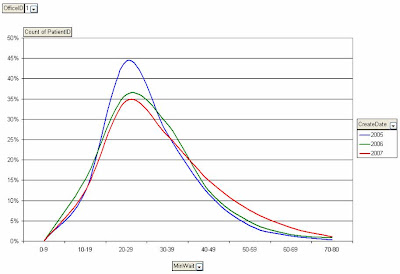
Our clinic, therefore defines a failure in service to be keeping a patient waiting for consultation greater than 50 minutes. In industries, they measure failures as defects per million units. A high failure rate is 3 sigma which is 66,000 defects per million (where most industry operates) and a low failure rate is 3.4 defects per million. You do not, however, have to wait for 1 million patients to come through the door, an adequate sample can be taken (in our case we data-mined approximately a thousand but several hundred is usually more than enough) and created this curve of waiting.


In the curve you can see that our sigma value has actually gone up! Or in other words, as the years have progressed we’ve kept more people waiting longer than we like. Why? Our office increased utilization and moved to a bigger space. One would assume that a bigger office and more capacity would help with in-office wait but it seems to disrupt the patient flow (we’re working hard on decreasing the in-office wait with process analysis but that’s another blog).

I would suggest that each of you examine your different patient pools and make an estimation of how long a wait is too long for each group. Then track how many patients fall outside of that range and work to six-sigma levels of not keeping patients waiting.

Saturday, March 1, 2008

Google Missed the Boat on Health

At the risk of having my blog removed by the very people that host it (OK, I admit it, I have secret fantasies that the upper echelon at Google reads and cares about my blog) I have to say I was disappointed with the Google Health announcement.

Google has teamed with the Cleveland Clinic to create portable health records. The new Google platform uses GData protocol to allow people to store and share their medical records from a central repository. The screen shots of the new platform resemble a Google page to allow the patient to import records, search for information and find resources.

While I cannot argue the utility of being able to have a portable record, nor can I argue the nobility of Google for taking on this cause I can’t help but think they’ve absolutely missed the boat. The truth, as I see it, is that most of the population rarely visits their physician during the year and when they do it’s for a specific problem. While their past medical history is important it is rarely critical or difficult to review verbally. From the provider point of view, we usually make our clinical decisions by listening and examining the patient. The medical record is absolutely necessary but doesn't usually “make” the diagnosis.

I wish that Google had put their efforts into improving access and efficiency in the system. For a lot of the world, it’s not the portability of medical records but access to care that’s at stake. Improving efficiency at the primary care level would go a long way to helping with that cause. Take a look at www.google.com/analytics. When I read my web-statistics there is an amazing amount of data about visitor type, usage, time of day, time on site, and many other demographics. I have long dreamed of having a similar Google dashboard to organize and control patient flow, wait times and treatment delay. Giving clinics the ability to visualize patient flow will help reduce wait times.

Health institutions can afford to have IT, Six Sigma and Lean consultants do this type of work but it’s out of reach for smaller clinics who provide the majority of primary care. It’s not technically easy to do either, because of the disparity in clinic IT systems. If Google applied the same use of programming cookies and central processing to small clinics, dissimilar IT systems could have key performance indicators summarized the same way disparate web sites do. Google’s forte has always been putting information into the hands of the “little guy” so I hope they’ll one day take a look beyond the major health institutions and put some of their computing power into organizing primary care.

Friday, February 29, 2008

Block Booking Example to Improve Patient Flow

Back on February 20th I wrote about the principals of block booking and why they control waiting. In a nutshell, blocking time for different patient groups ensures that everyone who needs an appointment wait’s the correct amount of time. As long as a clinic is using 80% of their time, you can only see one group of people quickly at the expense of others. So setting waiting goals is not only good for patient flow but it will improve patient satisfaction.

Today I’ll walk through an example. A clinic set guidelines for two sets of patients – those that require a skin lesion to be checked (Mole Group) and those that call in with sore joints (Joint Group). The clinic decides that the goal waits will be 10 days for the mole group and 20 days for the joint group.

Here are the steps to create the blocks:

Count how many people from each group are currently booked going forward
(appointment blocks are in bold)
Example: Joint 40 people, Mole 30 people
Count how many from each group have been seen in the last 30 days
Example: Joint 120 people, Mole 15 people
Calculate you completion rate (average number completed per day)
Example: Joint = 120/30=4 per day, Mole = 15/30=0.5 per day
Calculate Wait Time at Current Completion Rate = Booked/Completion Rate
Example: Joint = 40/4 = 10 days, Mole = 30/0.5 = 60 days
Calculated the number of appointment slots per day required to meet Wait Time standards
Example: Joint = 40/2 = 20 days, Mole = 30/3 = 10 days

In the schedule you need to block 2 appointments per day for people with joint pain and 3 per day for mole evaluation. Some of you may ask why I calculated the completion rate in Step 3. The reason is that there is going to be a change to the flow of patients in the clinic. The back staff may on be equipped to see one mole patient every 2 days. If they are going to be seeing 3 per day it may have an impact on what they need and/or how the set-up for this type of patient. Also, for these two groups of patients the number of reserved slots is increasing from an average of 4.5 per day to 5 per day. As long as 80% of the schedule is being booked these extra slots will have to come from another patient group.

If you’re clinic moves to block booking you also need to have a group of patients that could use more urgent appointments (short notice list). If a block has not been filled by ½ of the desired wait time (e.g. there is an open block for the mole group at 5 days and joint group at 10 days), fill it in with someone from the short notice list. The graph below is an example of how block booking dampened the amount of variation for a group of same day surgery patients (blocking started in early 2006).


For those clinics with more sophisticated technology (data mining techniques) other systems can be used to count the patients waiting or already treated and their mean wait times. In our clinic, the mean wait time is measured directly from the appointments (date of appointment – booked date) and the number of patients in the queue is also measured directly. Block booking will improve patient flow and satisfaction. It also let’s the clinic set and manage priorities in a very logical and planned fashion.

Wednesday, February 27, 2008

Wait, Expectations, Satisfaction and Intention to Treat

Is it possible to keep someone waiting in health care so long that they will change their treatment because of bad service? This question goes to the heart of customer satisfaction in health care and it is not an easy answer. The caveat is that every specialty will be slightly different so the validations I provide may not extend to different professions.

While watching 60 Minutes (a TV show out of the US) they did a study on the happiest people on earth. Who, you ask, are the lucky citizens? The answer is of course the citizens of Denmark. When researchers delved further into the source of their happiness what they found was a bit of surprise. It was not that the Danish are blessed with extraordinary love, money or social safety nets – apparently they have low expectations.

Which brings me to the point of this blog; client satisfaction is not derived from extraordinary service (although it helps) it comes from exceeding the expectations of you’re clients. Mathematically, client satisfaction (CSAT) = Outcomes – Expectations.
Now, this all sounds good on paper but how does one judge outcomes and expectations in health care? Researchers have created a measure called the SERVQUAL (Service Quality) scale that has been validated (tested) in healthcare and dentistry. It has five dimensions; Reliability, Responsiveness, Assurance, Empathy and Tangibles. An excellent summary (e.g. readable) can be found in the British Dental Journal, 1999 by PRH Newsome and GH Wright.

In short it discusses whether it is possible for a patient to be dissatisfied. The obvious answer is yes. People want to be engaged in their own care and will pass judgment. It also discusses how clients will judge their health care provider which is not such an easy answer. Because clients generally don’t have the technical knowledge to develop expectations about skills and outcomes they don’t have a significant impact on the CSAT. Rather the tangible aspects of a clinic such as waiting, empathy, cleanliness, accessibility, physical facilities, etc… are what will satisfy you’re clients.

The SERVPERF itself is divided into the five dimensions, each with many questions then repeated for expectations and outcomes. I’ve found this too long to be practical in a busy practice. Because expectations do not add a lot to the reliability of the CSAT in health care they can be omitted with minimal impact. Instead a shortened version can be used (see RATER scale as an example).

Now that I’ve established that customer service can be accurately measured, why should you do it and how does it impact on wait times?

First, imagine you are a surgeon seeing consultations half the day then doing surgery the other half. If you keep the consultations waiting long enough some of them will not book with you because they perceive you as being incompetent. You, as the surgeon, seek to serve the community as well as you can and that means fully booking you’re days. You will have to see a greater number of consultations for each surgery. In other words, for each surgery you do, you will have to see 10% or 20% more consultation because of bad time management. This is a vicious cycle because the more consultations you have to see the more likely you are to run slower. However, there is also a threshold for each type of healthcare. For instance, someone waiting on a consultation for an aortic aneurysm repair is likely to be more forgiving than someone getting their wisdom teeth out. In my next blog I will discuss how to determine that magic threshold and how to monitor it a meaningful way.

RATER SCALE
Reliability
CDSG.ca is dependable (1-5)
When you have problems CDSG.ca is sympathetic and reassuring (1-5)
CDSG.ca Provides it services at the time it promises to do so(1-5)
Assurance
You can trust employees at CDSG.ca (1-5)
You feel safe in your transaction with CDSG.ca employees (1-5)
Tangibles
The CDSG.ca facilities are visually appealing (1-5)
The employees at CDSG.ca are well dressed and appear neat (1-5)
Empathy
Employees of CDSG.ca do not know what your needs are (1-5)
Employees of CDSG.ca do not give you personal attention (1-5)
Responsiveness
You do not receive prompt service from CDSG.ca employees (1-5)
CDSG.ca does not tell you exactly when services will be performed. (1-5)

Monday, February 25, 2008

Phone Screening & Open Access (Same Day) Surgery

Let me preface this blog by saying that I believe our clinic runs efficiently. We are a specialty clinic where patients are referred from generalists, seen for consultation then booked for surgery if needed. After doing a process flow map from the patients’ perspective we realized there was a group of patients that could have their consultation and surgery on the same day.

Having a consultation and procedure for surgery completed in one appointment saves the patient two trips to the clinic (including two sets on phone calls, in-clinic waiting, etc….), and the clinic from having to organize two appointments. Of course, a certain percentage of these people will arrive expecting to have the surgical procedure completed and it will not be required, thus wasting a surgical appointment.

The corollary is that when surgery is completed with more than one appointment there is the potential that the patient will not follow through (thus wasting a consultation appointment), that the appointment will be forgotten, that there will be an administrative error causing missed or forgotten appointments or another type of error that introduces wasted time. Multiple appointments, however, ensures that all surgical appointments booked are truly required.

We decided to put the theory to the test that having strict phone screening of patients that were referred for open access appointments (same day surgery) would decrease workload. The list was very simple – the patient is not on wafarin (a blood thinner), they don’t need pre-op antibiotics, they can have it done under local anaesthetic and a few others. If the patient met the criteria they were booked for surgery and consultation the same day. We did this for 10months then compared those patients to a group from the corresponding 10 months in the previous year (prior to having the list in place).

What were the results? In the study period 2627 patients were reviewed and compared to 2187 patients in the ‘control’ period (for the purists out there we also studied the demographics and compared them using t-tests and chi-square analysis; they were the same). An additional 3% of patients (100) had their surgery done the same day (p=0.000003 for the statisticians) which was a very significant difference. Now 3% may not seem like a lot but it saved us a total of 25 hours worth of work on the surgeons part and days of waiting on the patients part. It also opened up 25 hours worth of time for other patients, thereby decreasing our wait time for everyone.

Did we find any surprises – yes. As I’ve mentioned in other posts, 5.5% of patients did not follow through in both groups. One would assume that as more patients had same day surgery the non-follow through group would diminish but we didn’t see it. I don’t think this is a statistical glitch, I believe that there is a group of patients that are reluctant to follow-through and no matter how you book them it won’t happen.

The take home message is that working to condense appointments can save the clinic and your clients’ time. The effect is exponential for the administrative staff because every additional appointment adds work before and after especially when appointments are missed or moved. Have strict written criteria and reinforce it rigorously.

Amendment to this story as of May 23, 2008: We have had to add the biphosphonate group of drugs to the list of those that can't be booked for open access because they need a 3 month drug holiday.

Friday, February 22, 2008

Meeting Wait Time Demands

The holy grail of wait time management is the merging of the need of the client and the availability of the provider. Imagine a system, where health care wait times of various patient groups are monitored then adjustments to the schedule are made (with block booking) to meet as many of the needs as possible.

The dilemma is that if a clinic is already running near 100% capacity seeing someone too quickly has to have an effect on someone else. In other words, seeing a patient 10 days quicker than they really need (or expect) will leave someone else, more needy, waiting 10 days too long. Ideally, a clinic sets the goals for health care wait times for each group of patients and strictly enforces them – to the betterment of the population of patients.

The problem is in the practical application of this method. Setting the goals is easy enough. But to measure the actual wait time is difficult. Let me preface the next section by saying I am neither a mathematician nor politician just someone trying to meet the needs of patients. The easiest solution is for the clinic to have someone look ahead in the schedule and estimate the wait for each block of patients. It is time consuming and can be inaccurate. Alternatively the average wait for a group of patients in the preceding month or two can be measured directly but it will lag months behind and doesn’t help when trying to ramp up scheduled time during variation. For the more mathematically inclined, you can use standard queuing theory models such as M/M/1, M/D/n, etc… but all assume a queue that is not growing (where as we are trying to change the number of providers or servers to match the need) or Little’s Law (which breaks down when the queue empties).

All that is left is the brute force method of measuring the number of available appointments per day and the number of booked patients then dividing one by the other to come up with an average wait time. This is the most dynamic but requires data mining expertise. It is, however, the most accurate from what we have found.

The benefit for clinics in both private and public sectors comes from improvements in efficiency and better patient flow. By meeting the needs of the clients rather than exceeding some and leaving other short. In industrial terms, they call this leveling process and it refers to decreasing the variation that’s in the system. The less variation that is in the system, the more efficiently it will run.

Wednesday, February 20, 2008

Block Booking vs Priority Booking

What is block booking and priority booking and what are their advantages? I was recently approached by a colleague when I was talking about the advantages of block booking. He said that he wasn’t using block booking and no intention of using it.

In block booking, certain slots during the day are reserved for certain types of patients/clients. For instance, a family doctor might reserve 3 x 15min slots for asthma patients, 2 x 30min slots for new patients, etc…. The slots are held until the latest possible moment then filled with more urgent patients (more on the timing of this later). The alternative is a first-come-first-serve model (whoever calls in gets the next available appointment).

My colleague said that he saw no advantage to it. His waiting list was longer than two months to see him, in his mind no amount of juggling the schedule would change that waiting time for the patients. If the mean wait would continue to be 60 days, why play with the schedule. Rather than arguing about lean theory, six sigma and the benefits of a pull system (which are the theoretical basis for block booking) I told him about Disney World. At Disney I could take my family and get a fast-pass for each ride. I could get only one pass at a time, which let me to the front of the line at the time specified. While waiting I could get on other rides that were less popular. If I timed things well, I would spend much of the day using the fast-pass. If everyone at Disney was doing the same thing all of us would have the same effect. Although the mean wait for rides didn’t change our satisfaction was greatly improved.

Block booking works in a similar way. A patient with an acute asthma exacerbation needs an appointment sooner than someone with a sore joint from arthritis than someone with chronic migraines. If the clinic knows how many patients arrive with a certain type of ailment per month they can reserve the time based on the desired level of service. Let’s say 60 patients arrive each month with arthritis pain for evaluation. If the desired wait time is 15 working days then 4 slots per day need to be reserved. Priority booking is the same beast by another name. In priority booking, certain patient types are brought to the front of the line at the expense of others. In block booking, the natural variation in patient arrivals will result in a longer wait. In priority booking, one group of patients wait time is kept static and the others are allowed to vary. Priority booking is necessary for patient types that cannot wait more than a certain amount (e.g. chest pain, cancer, etc…) although it is used for priority programs as well by some institutions.

Block booking and priority booking add benefit to the system in 2 ways. First, they improve client satisfaction. Second, they decrease the amount of variation in the system which improves overall efficiency.